How long it has been today
Today's total sits at the top in large type. The three counters below it show how many different sites you visited, how many visits you made and how many searches you typed.
The SELFLEX app for Apple Watch brings today's browser time, your weekly rhythm and your most-visited sites to your wrist. The only screen you need to wake is the one you are already wearing.

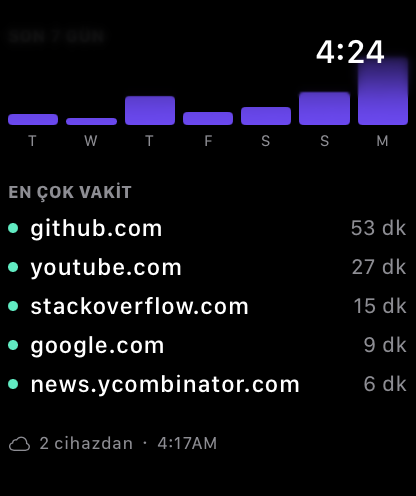
Not a shrunken dashboard: the watch carries only what can be read at a glance, and everything else stays on the iPhone.
Today's total sits at the top in large type. The three counters below it show how many different sites you visited, how many visits you made and how many searches you typed.
Days are drawn as a bar chart built for the small screen, so where today stands against the rest of the week is immediately visible.
Your most-visited sites are ranked with their durations. The dot next to each row marks the category the site belongs to.
Measurement happens in the browser; the watch only shows the result. That separation is structural, not a setting.
The summary comes from SELFLEX on your iPhone. The watch does no browser measurement and creates no records of its own.
The watch app never goes online. It reads from the shared storage between devices signed in to the same Apple Account.
Add it to your watch face and the summary opens with a single tap.
With SELFLEX Sync on, the total on your watch is the combination of time from your Mac and iPhone. The bottom line tells you how many devices it came from.
The watch app ships inside SELFLEX. There is nothing extra to download from the App Store.
The summary is fed by SELFLEX on your iPhone. Open the app on the iPhone once after installing; the watch updates itself when the two devices are nearby or on the same network. To see several devices in one total, turn on the “Visit records” group in SELFLEX Sync.
SELFLEX sends no notifications, sets no goals and puts you on no leaderboard. It shows the time that passed; the decision is yours.